
On July 8, 2025, Mozilla shut down Pocket. After 13 years of saving articles, videos, and links, millions of users suddenly needed a new home for their reading lists — and a way to rescue what they’d already saved.
If you’re reading this, you’re probably trying to do one of two things: make use of a Pocket export you saved, or figure out where to go next. This article covers both.
Is the Pocket export still available? No. Mozilla kept the export open after the shutdown, extended the deadline twice, and closed it for good on November 12, 2025 — when the remaining user data was queued for permanent deletion. If you didn’t export by then, there’s no way to get your list back from Pocket. That’s exactly the kind of risk local-first apps like Tuckii are designed to prevent.
Find the Pocket export you already saved
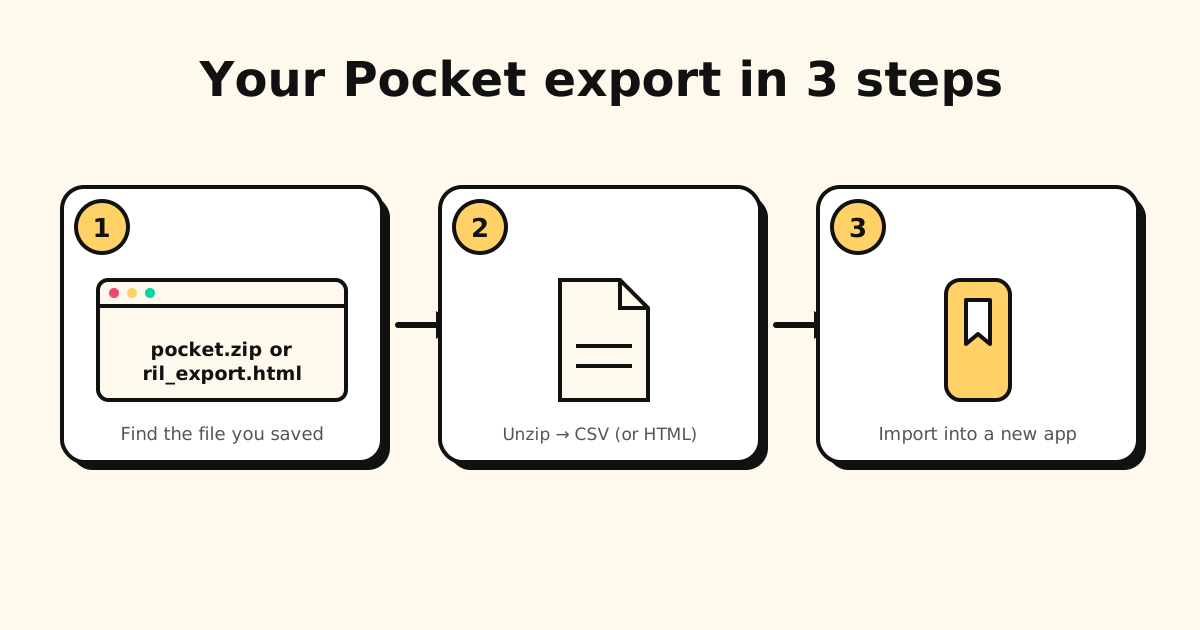
Pocket’s export page is gone, so the only copy is one you downloaded before the deadline. Where to look:
- A
pocket.zipfile. 2025 exports came this way: clicking Export CSV file sent the zip to the email address on your Pocket account. Search your inbox for the email from Pocket, and check your Downloads folder. - An
ril_export.htmlfile. Older exports were a single HTML file with this name. - Once you’ve found it, copy it somewhere you won’t lose it — a cloud drive, an external drive. This file is your entire Pocket history now.
What’s in the export file?
It depends on when you exported:
pocket.zip(2025): unzip it and you get a CSV file — a plain spreadsheet you can open in Excel, Numbers or Google Sheets. If you used Pocket’s highlighter, the zip also holds a separate file with your highlights.ril_export.html(older): a single HTML page you can open in any browser.
Either way, the list contains:
- The URL of every saved item.
- The title (as Pocket recorded it — sometimes truncated or missing).
- A timestamp of when you saved it.
- Any tags you assigned.
- Whether the item was in your unread list or archive.
What’s not included: the full article text, thumbnails, or reading progress. Those lived on Pocket’s servers and are gone with them.
What to do with the export file
Both formats are human-readable — open the HTML in any browser, or the CSV in a spreadsheet, and you’ll see your list. But you probably want something more useful than a file to browse.
Option 1: Open it and rescue the links that still matter
Be honest: most of what’s in your Pocket archive is stale. Articles from 2019 you never got around to reading. Links to sites that no longer exist. Product research for things you already bought or decided against.
A more practical approach: open the export file, skim through the titles, and manually save the ones that are still genuinely useful into whatever app you’re moving to. This takes 30–60 minutes for a large archive but leaves you with a clean, relevant library rather than importing thousands of outdated links.
Option 2: Import into a bookmark manager that supports Pocket format
Some bookmark managers accept Pocket’s export directly. Tuckii reads both the CSV and the older HTML file under Settings → Backup & Restore → Import Bookmarks — unzip pocket.zip first and pick the CSV inside. It brings in each link’s title and address; the free plan imports a starter batch, and Pro imports the whole file. Other managers, Raindrop.io included, have their own import options, usually under Settings → Import — check which Pocket format they accept.
Worth noting: bulk imports often result in the same problem as the Pocket archive — a large collection of links you don’t actually use, just in a different app. The manual curation approach (Option 1) usually produces better long-term results.
Why Pocket’s shutdown matters beyond the inconvenience: Pocket had tens of millions of users and the backing of Mozilla. It still shut down. This is a reminder that any service storing your data in the cloud can disappear — and when it does, getting your data out quickly becomes urgent — and, once the deadline passes, impossible. A local-first app stores your links on your device; there’s no server to go dark, no account to lose access to, no export deadline.
Where to go after Pocket
The right Pocket replacement depends on what you actually used Pocket for. Most people used it for one of two things:
- Read-it-later articles — long reads you wanted to consume at a better time, often with Pocket’s text-view for distraction-free reading.
- General link saving — any URL you wanted to remember, whether it was an article, a product, a tool, or a video.
If you primarily want a distraction-free reading experience with text extraction and highlighting, Readwise Reader or Instapaper are the closest matches to Pocket’s reading experience. For the full field, see the best Pocket alternatives; if Raindrop.io was your other option, compare the best Raindrop.io alternatives too.
If you want a private, no-account link library that works for any URL from any app — Tuckii fits. Your links stay on your device. There’s nothing that can shut down and take your data with it. And the one-tap save from the share sheet covers every platform Pocket didn’t: TikTok, Instagram, X, YouTube, podcasts.
A lesson from the Pocket shutdown
Services that store your data in the cloud have a dependency you don’t control: the company has to keep existing, keep paying for servers, and keep prioritizing your data. When they stop — due to shutdown, acquisition, or pivot — your data is at risk.
The only data you truly control is data stored locally, on a device you own. That’s the model Tuckii is built on. No account, no company cloud, no single point of failure. Your links are in a local database on your phone; uninstalling the app deletes the data, but no external event can take it from you.
A Pocket replacement that won’t shut down on you
Your links live on your device. No account, no company cloud, no expiry date. Save from any app with one tap.
Download Tuckii free →