
Think about every link you save. Articles you want to read later. Tools you want to try. Products you’re researching. Videos you’ll never finish. That list is a detailed map of your interests, your habits, and often your intentions.
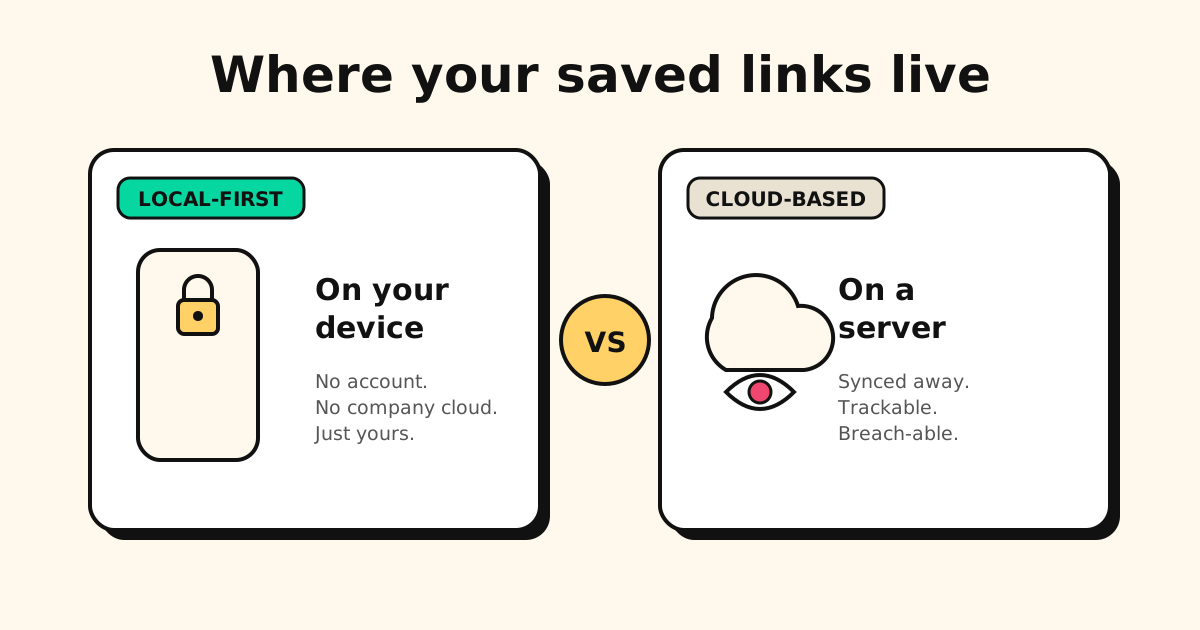
Most bookmark managers send that map to a cloud server — which means a company (or their advertising partners) can see it. Tuckii doesn’t.
What “local-first” actually means
A local-first app stores your data on your device. It doesn’t need a server to work, and it doesn’t send your data anywhere unless you explicitly ask it to.
For a bookmark manager, this means:
- Your list of saved links lives on your phone — not on a company’s server.
- The app works offline, because your library is on the phone itself.
- Uninstalling the app removes your data from that device.
- There’s no account to create, no email to give, and no password to forget.
Contrast that with most bookmark apps: they ask you to sign up, they store your links in their cloud, and when they shut down — as Mozilla did with Pocket in July 2025 — your data disappears with them.
Why “no account required” matters more than it sounds
Every account you create is a potential breach. Services get hacked; credential databases get leaked. If your bookmark manager requires an account and it gets breached, your browsing habits, saved articles, and private links could be exposed.
With a local-first app like Tuckii, there’s nothing to breach. The server doesn’t hold your data because the server never receives it.
Tuckii’s data model at a glance: Your links, collections, notes, and tags are stored in a local SQLite database on your device. Tuckii’s backend only receives the URL you’re saving — to fetch the title, description, and thumbnail. Your personal library is never sent to Tuckii’s servers.
What Tuckii’s servers see (and what they don’t)
When you save a new link, Tuckii sends the URL to its metadata service to fetch the page title, description, and thumbnail image. This is the same thing a browser does when you open a link — except Tuckii’s service doesn’t log your identity, connect the request to your account, or store which URLs you’ve saved.
There’s no user ID attached to the metadata request, because Tuckii has no user IDs. You can also check Tuckii’s privacy policy for the full details.
Optional iCloud Sync is yours, not ours. On iPhone, iPad and Mac, Tuckii Pro can sync your library — links, collections, tags and images — through your own private iCloud. The data goes from your device to your iCloud account; Tuckii’s servers never receive it, and you can delete the iCloud copy any time in Settings → Cloud Sync. Nothing syncs until you tap Sync Now.
Local-first vs. cloud-based: what you give up
Being honest: local-first isn’t free. There are trade-offs.
- Sync stays inside Apple devices, for now. With Pro, iCloud Sync brings your library across your iPhone, iPad and Mac with a tap on Sync Now. It doesn’t cross over to Android: Google Drive sync for Android is coming soon, and until then you move your library with a backup file.
- No web access. Tuckii has apps for iPhone, iPad, Mac and Android, but no website — you can’t log in from a browser to see your saved links.
- Backups are your responsibility. Tuckii’s optional Pro tier lets you export a JSON backup — but you need to actually do it. iCloud or Google Drive can store the file; Tuckii just creates it.
For many people — especially those with one primary phone — none of these matter. And the privacy gain is worth more than the convenience loss.
Who Tuckii is for
Tuckii is built for people who:
- Save links while scrolling and want to find them again later
- Are tired of creating accounts for every new app
- Care about privacy but don’t want to self-host a server (that’s for Linkwarden)
- Want something fast and simple, not a full knowledge-management system
- Left Pocket after Mozilla shut it down and want a private, lightweight replacement
How to save links to Tuckii
Tuckii installs a share-sheet extension when you install the app. After that, saving a link from any app takes one tap:
- Find the link you want to save — in Safari, Chrome, Twitter/X, Instagram, YouTube, a podcast app, anywhere.
- Tap the share icon.
- Tap Tuckii in the share sheet.
- Done. Tuckii fetches the title, description, and thumbnail in the background.
No copy-pasting URLs. No opening another app first. Just one tap from wherever you are.
Privacy doesn’t stop at where links are stored: links you copy out of apps often carry tracking IDs
like utm_source, fbclid or YouTube’s si. Our free Link Cleaner strips them
right in your browser before you share a link.
Try Tuckii — your links, on your device
No account. No company cloud. No tracking. Save links from any app and find them again in seconds.
Download free →