
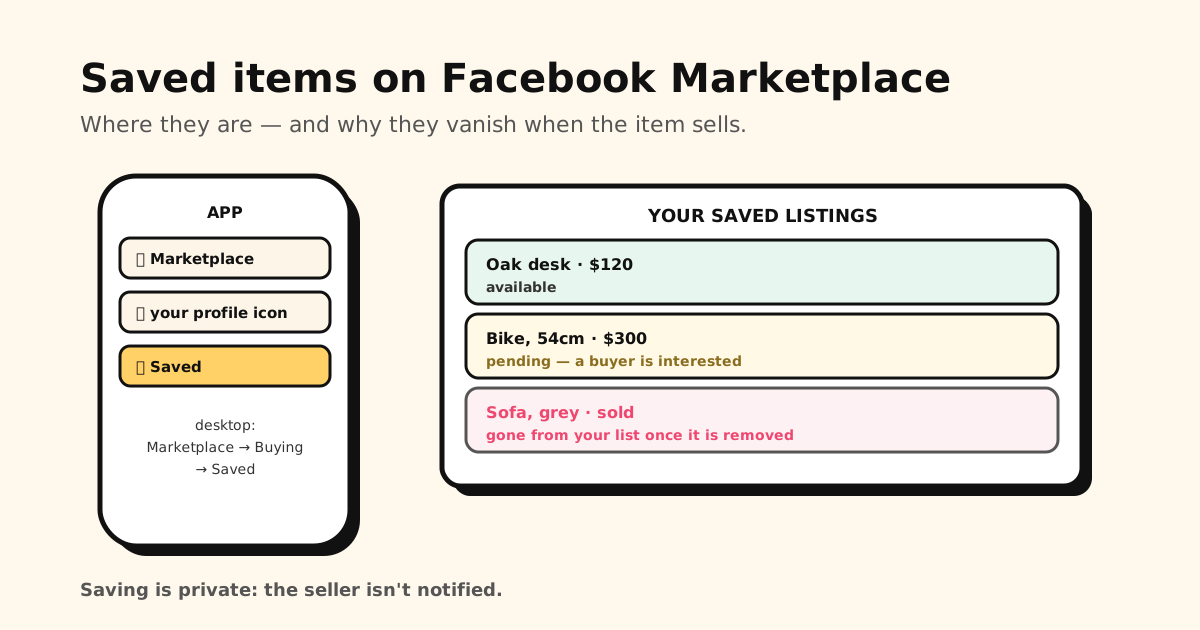
Quick answer: in the Facebook app, open Marketplace, tap the person icon at the top, then
Saved. On a computer, go to Marketplace → Buying → Saved, or straight to
facebook.com/marketplace/you/saved. Saved listings vanish once they sell or get removed — so if
you’re tracking something, keep your own copy.
How to see saved items on Marketplace (iPhone)
- Open the Facebook app and go to Marketplace (the shop icon, or Menu → Marketplace).
- Tap the person icon in the top-right corner of Marketplace.
- Tap Saved.
How to see saved items on Marketplace (Android)
- Open Facebook and go to Marketplace.
- Tap the person icon at the top of Marketplace.
- Under Buying, tap Saved.
How to see saved items on Marketplace (desktop)
- Go to facebook.com and click Marketplace in the left-hand menu.
- Click Buying, then Saved.
Bookmark facebook.com/marketplace/you/saved to skip the clicks. The same area also has Recently
viewed — handy when you looked at something but never tapped save.
Why saved Marketplace items disappear
A save on Marketplace is a pointer to someone else’s listing, not a copy. So your saved list changes whenever sellers change things:
- Sold or shipped: the item is no longer available, and it drops out of your saves.
- Removed or expired: the seller deleted or stopped renewing the listing — your save goes with it.
- Pending: someone else is in talks with the seller. It may come back, or sell.
This is the same weakness as Facebook’s regular saved posts: Facebook keeps nothing for you once the original is gone. If the photos, price or seller name matter to you, save them somewhere else before the listing changes.
Is saving a Marketplace listing private?
Yes. Saving is visible only to you, and the seller isn’t notified. They only find out you’re interested when you message them or make an offer.
How to unsave a listing
In the app, open your Saved list, tap the three dots on a listing and unsave it. On a computer, click the listing’s save icon again. Clearing out sold items makes the ones you’re still watching easier to spot.
Keep a copy of the listings you’re tracking
If you’re comparing a few bikes, sofas or cars, the Saved list is a fragile place to do it — nothing to note the price you saw, and items vanish without warning. A sturdier habit:
- Share the listing link from Marketplace to Tuckii, into a collection like Buy · compare.
- Add a note — price, condition, seller, pickup area — and Tuckii’s search will find it later.
- Screenshot the listing and share the image into the same collection. The link stops working when the item sells; the screenshot doesn’t.
Tuckii is an app for iPhone and Android that keeps links and screenshots from any app in one place. No account, and everything stays on your device.
Track the listings you’re serious about
Save Marketplace links and screenshots into Tuckii, add notes on price and condition, and find them again in seconds. No account needed.
Download Tuckii free →Saving from other apps too? Here’s how to save links from TikTok, Instagram and any app, and how Reddit’s saved posts work.