
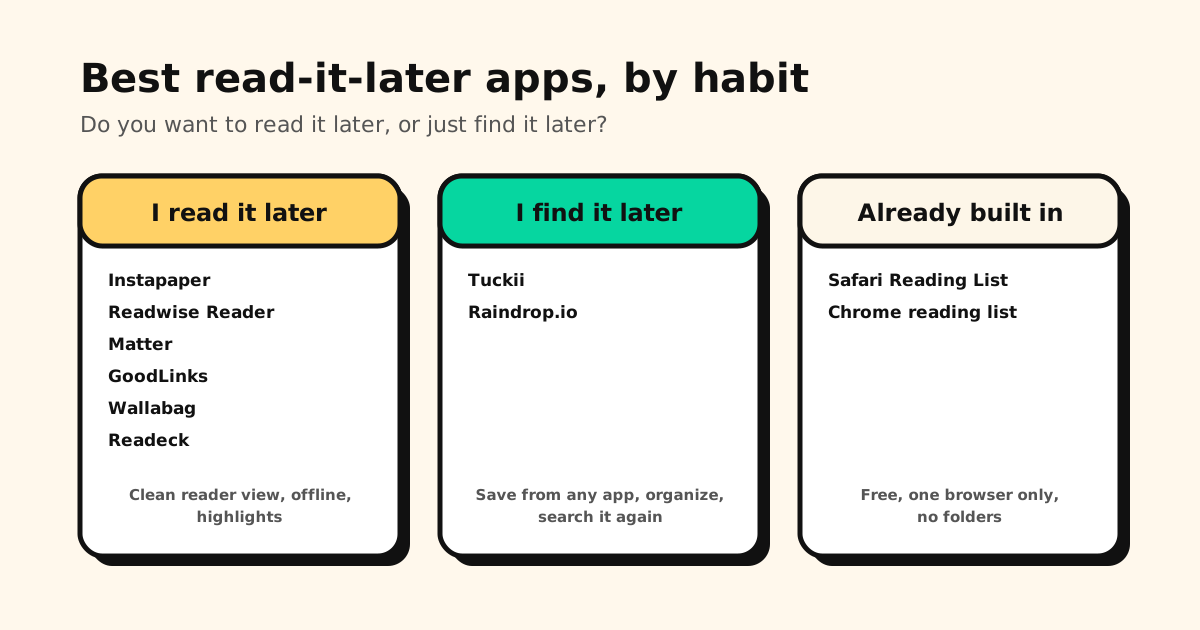
A read-it-later app does one job: you see something worth reading, save it in a tap, and read it later, somewhere calmer. Which app is best depends less on features than on how you read. Here are the best read-it-later apps in 2026, grouped by habit, with the free options already on your phone.
Quick answer: the best read-it-later apps in 2026
- Best overall, and best free: Instapaper
- Best for heavy readers who highlight everything: Readwise Reader
- Best reading view on iPhone and iPad: Matter
- Best on Apple devices, pay once, no account: GoodLinks
- Best open source, self-hosted: Wallabag or Readeck
- Best for saving from any app to find later (not a reader): Tuckii, our app
- Best bookmark library with a reading mode: Raindrop.io
- Free and already installed: Safari Reading List or Chrome’s reading list
Leaving Pocket specifically? That’s its own guide: the best Pocket alternatives in 2026, including how to bring your export along.
First: do you read it later, or find it later?
Most “read later” saves fall into two habits, and they want different apps:
- You actually read it later. Long articles, newsletters, essays. You want a clean reader view, offline copies for the train, maybe highlights and text-to-speech. That’s a reader app: Instapaper, Readwise Reader, Matter, GoodLinks, Wallabag, Readeck.
- You save it to find again. A recipe, a product, a TikTok, a thread a friend sent. You rarely read it top to bottom; you need to find it in three weeks. That’s a saver: a bookmark app that takes links from any app and keeps them organized, like Tuckii or Raindrop.io.
Plenty of people do both, and use one of each. Picking the wrong type is why so many read-later lists turn into a pile you never open.
Read-it-later apps compared
| App | Best for | Free plan | Account | Platforms | Offline reading |
|---|---|---|---|---|---|
| Instapaper | Reading later, free | ✓ No cap on saves | ✗ Required | iPhone, Android, web, e-readers | ✓ |
| Readwise Reader | Highlights, RSS, PDFs | 30-day trial | ✗ Required | iPhone, Android, web, Mac, Windows | ✓ |
| Matter | Reading on iPhone and iPad | ✓ Library, tags, search | ✗ Required | iPhone, iPad, web | ✓ By default |
| GoodLinks | Apple devices, pay once | Buy once | ✓ iCloud only | iPhone, iPad, Mac | ✓ Full text saved |
| Wallabag | Open source, self-hosted | ✓ Self-hosted | Your server or theirs | Web, iPhone, Android, extensions | ✓ In the apps |
| Readeck | Open source, self-hosted | ✓ Self-hosted | Your server | Web, iPhone, iPad, Mac, Android, e-readers | ✓ In the apps |
| Tuckii | Saving from any app, finding later | ✓ Everyday saving | ✓ None | iPhone, iPad, Mac, Android | ✗ Saves links, not articles |
| Raindrop.io | Bookmark library with a reading mode | ✓ No cap on bookmarks | ✗ Required | Web, iPhone, Android, Mac, extensions | ✗ No offline mode |
Checked on each app’s own site, help pages and store listings in November 2026. Prices in this article are US list prices as of November 2026, unless noted, and change by country. Full disclosure: Tuckii is our app, and it isn’t a reader; we’ve tried to be fair to the rest.
Reader apps: for when you actually read it later
1. Instapaper: best overall, and best free
Instapaper has been saving articles to read later since 2008, and in 2026 it’s still independent (its owner calls it “not VC-backed”) and still shipping: AI voices, a redesigned iPhone app (Instapaper 10, in July) and an API update this year. It strips each article down to a clean, readable view and downloads your unread articles so they open without a connection.
The free plan saves as many articles, videos and pages as you like, with folders and sync across the web, iPhone and Android. Premium adds full-text search, a permanent archive, a PDF reader, more than the free plan’s 5 notes a month, Kindle delivery, AI voices and text-to-speech playlists, and speed reading. It also works on Kobo e-readers with a free account, plus Kindle and Boox.
- Best for: most readers, especially on a mix of iPhone, Android and an e-reader
- Platforms: web, iPhone, iPad, Android, browser extension, Kobo, Kindle, Boox
- Price: free; Premium $5.99/month or $59.99/year
- Good to know: needs an account; imports a Pocket export
→ Weighing it against a no-account option? Instapaper alternative: save links from any app without an account.
2. Readwise Reader: best for heavy readers
Readwise Reader puts everything you read in one place: saved articles, RSS feeds, email newsletters, PDFs, EPUBs and more, with highlights, notes and AI-voice text-to-speech. It works offline and sends documents to your Kindle.
There’s no free plan, only a 30-day trial with no credit card needed. It imports a saved Pocket export, Instapaper, or a CSV of links.
- Best for: researchers, writers and anyone who highlights and annotates
- Platforms: web, iPhone, iPad, Android, Mac and Windows apps, browser extensions
- Price: Reader alone $7.99/month, or full Readwise $9.99/month, both billed yearly
- Good to know: needs an account; the most powerful app here, and the most to learn
3. Matter: best reading view on iPhone and iPad
Matter is a reading-first app with a polished, distraction-free view. Its free plan includes an uncapped read-later library, as many tags as you like and full-text search, and articles are available offline by default. Premium adds high-quality text-to-speech, an AI co-reader, newsletter and RSS syncing, uncapped highlights and notes, and Send to Kindle.
- Best for: iPhone and iPad readers who care most about how reading feels
- Platforms: iPhone and iPad (iOS 26 or later), web; no Android app
- Price: free; Premium is a paid subscription
- Good to know: needs an account
4. GoodLinks: best on Apple devices, pay once, no account
GoodLinks is a read-later app for iPhone, iPad and Mac that you buy once. It syncs through your iCloud, so there’s no account to create, and it saves the full text of each article with highlights, notes, and export to PDF or Markdown. The purchase includes all current features for good plus a year of new ones; an optional Premium subscription unlocks features released after that, which you keep.
- Best for: Apple users who’d rather not subscribe or sign up
- Platforms: iPhone, iPad, Mac
- Price: $9.99 one-time purchase
- Good to know: imports Pocket, Instapaper, Raindrop, Matter, Readwise, Omnivore and browser bookmarks
5. Wallabag: best open-source read-later app
Wallabag is the long-running open-source answer to read-it-later: save articles, read them in a clean view, tag, highlight and archive them. Host it yourself for free (it’s MIT-licensed), or pay for wallabag.it, hosted in Europe, with a 14-day trial and no credit card needed. Its Android and iOS apps read offline, and articles export to ePUB, PDF and other formats.
- Best for: people who never want a company shutdown to take their reading list
- Platforms: web, iPhone, Android, browser extensions
- Price: free to self-host; wallabag.it from €11/year
- Good to know: self-hosting means you run the server and the updates
6. Readeck: best newer self-hosted reader
Readeck is a younger open-source, self-hosted read-later app with a clean design and active releases (version 0.23 arrived in August 2026). It has an official browser extension, Android app and an app for iPhone, iPad and Mac with offline reading, highlights and annotations, plus a community-made plugin for KOReader e-readers. It exports to ebook format and imports browser bookmarks, Pocket and Wallabag.
- Best for: self-hosters who want something lighter and more modern than Wallabag
- Platforms: web (self-hosted), iPhone, iPad, Mac, Android, browser extension, KOReader (community plugin)
- Price: free to self-host
- Good to know: you need a server or a home computer to run it
Savers: for when you mostly find it later
7. Tuckii: save it for later from any app (our app)
Tuckii isn’t a reader app, and doesn’t pretend to be. It’s for the other habit: saving links from anywhere so you can find them again. Tap Share → Tuckii in Safari, Chrome, TikTok, Instagram, YouTube, Reddit or Messages; Tuckii keeps the link with its title and preview, files it in a collection, and finds it with instant search.
It needs no account. Your library lives on your device; with Pro, a tap on Sync Now puts it on your other devices through your own iCloud (iPhone, iPad and Mac) or your own Google Drive (Android).
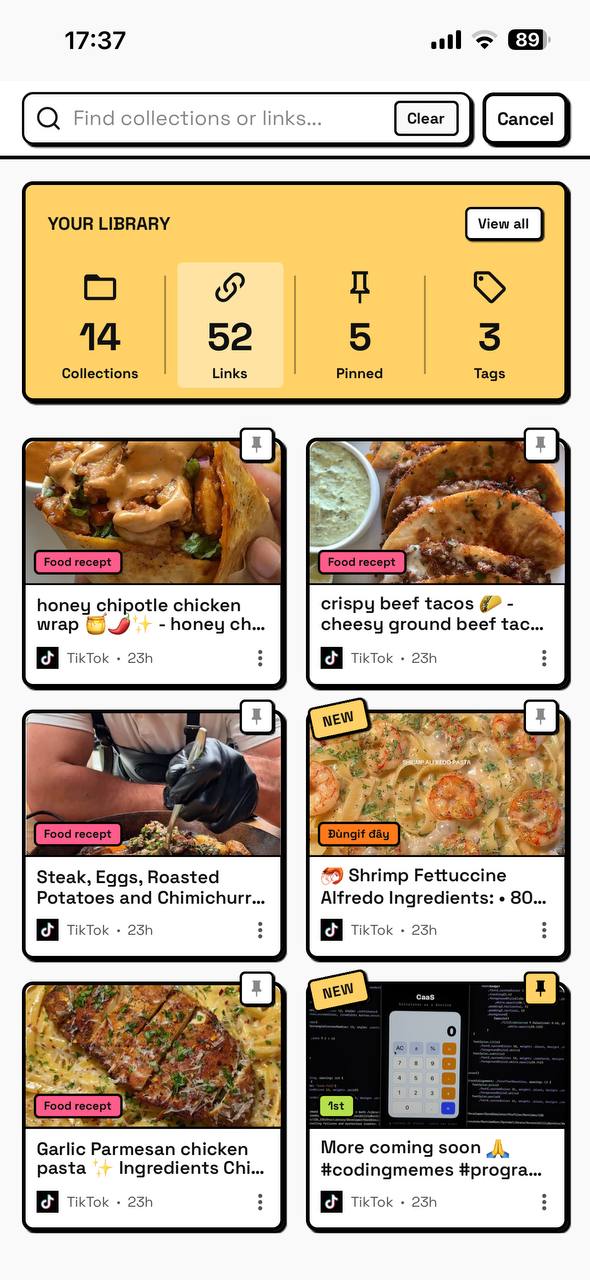
- Best for: people whose “read later” pile is really links from apps, not long articles
- Platforms: iPhone, iPad, Mac and Android
- Price: free for everyday use, tags included; Pro adds sub-collections, whole-collection sharing, a backup file and Sync Now
- Good to know: Tuckii saves the link and its preview, not a copy of the article, so there’s no offline reader view. Heavy readers often pair it with Instapaper or Matter. It imports Pocket and Raindrop exports and browser bookmark files; the free plan imports a starter batch, Pro the whole file.
8. Raindrop.io: bookmark library with a reading mode
Raindrop.io is a full bookmark manager that can also show articles in a clean reading mode. Its free plan doesn’t cap bookmarks, allows up to 100 highlights per bookmark (the same as Pro), and includes collections, tags and apps everywhere. Pro adds full-text search, permanent copies of saved pages, annotations, broken-link and duplicate checks, backups and an AI assistant. Raindrop’s own blog notes it has no dedicated offline mode.
- Best for: organizing a big library of links, with occasional reading
- Platforms: web, iPhone, Android, Mac, extensions for Chrome, Safari, Firefox and Edge
- Price: free; Pro is a paid upgrade (shown in your local currency)
- Good to know: needs an account; your library lives in Raindrop’s cloud
→ More options in this direction: the best app for saving links.
The free read-later lists already on your phone
Before you install anything, your browser may be enough:
- Safari Reading List (iPhone, iPad, Mac): Share → Add to Reading List. Turn on Settings → Apps → Safari → Automatically Save Offline to keep copies for offline reading, and iCloud keeps it the same on all your Apple devices. Here’s how Safari’s Reading List works.
- Chrome reading list (computer, Android, iPhone): ⋮ → Bookmarks and lists → Reading list on a computer; it syncs through your Google Account, but offline means downloading pages yourself. Here’s where Chrome’s reading list is.
- Firefox Reader View: strips a page down to clean text while you read. It’s a view, not a list.
Both lists are one browser only, with no folders or tags, which is fine for a short queue and frustrating as a long-term home. And one is already gone: Microsoft removed Collections from Edge in version 149 (June 2026).
The read-later graveyard: why exports matter
This category loses apps. Pocket shut down on July 8, 2025, and its export closed on November 12, 2025. Omnivore, the popular free open-source reader, closed its cloud service in November 2024. Edge Collections followed in 2026.
So whichever app you pick, check two things first: can you export everything, and can it import what you already have? Most apps above import a bookmarks file or a Pocket export, and the self-hosted ones can’t be shut down on you. Tuckii’s answer is different: your library is on your device, not on a server that can go dark.
Which read-it-later app should you choose?
- Read a lot, on any phone, and want it free? → Instapaper
- Highlight, annotate, follow newsletters and RSS? → Readwise Reader
- iPhone and iPad only, and reading feel matters most? → Matter
- Apple devices, no subscription, no account? → GoodLinks
- Want to host it yourself? → Wallabag or Readeck
- Your pile is mostly links from apps, not articles? → Tuckii
- A big organized library, reading now and then? → Raindrop.io
- Just a short queue? → Safari Reading List or Chrome’s reading list
Save it now, find it later, from any app
Tuckii keeps every link you save, from Safari, TikTok, Instagram or a group chat, in one searchable library on your device. No account. Free for everyday use.
Download Tuckii free →Still comparing? The best free bookmark manager compares free plans, and the best bookmark app for iPhone tests share-sheet saving app by app.