
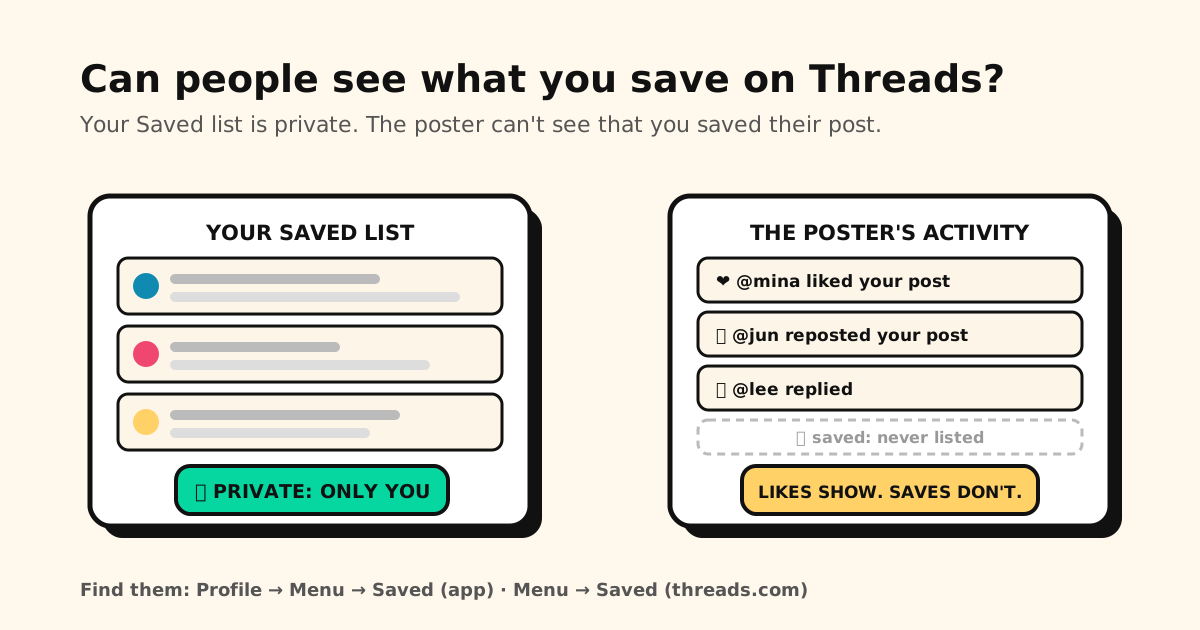
Quick answer: in the Threads app, tap Profile → Menu (top right) → Saved. On threads.com, click Menu on the left → Saved. And no, nobody else can see them: Threads’ Help Center says only you can view the posts you’ve saved, and when you save someone’s post, they can’t see that you saved it.
So you can save freely. It’s the opposite of a like: the author of a post can always see who liked it, but never who saved it. Here’s where your saves are, how to remove them, and what Threads doesn’t tell you.
Where to find saved posts on Threads
| Where | How to open Saved |
|---|---|
| Threads app (iPhone, iPad, Android) | Tap Profile or your profile picture (bottom right) → Menu (top right) → Saved |
| threads.com (computer or phone browser) | Click Menu on the left → Saved |
Menu is the two-line icon in the top right of your profile. Saved sits inside that menu, not on the profile page other people see.
How to save and unsave a post
- Save: tap the ⋯ icon in the top right of a post → Save.
- Unsave: tap the ⋯ icon in the top right of the saved post → Unsave. You can do it at any time.
- On threads.com: click the same ⋯ icon, then Save or Unsave.
Can people see what you save on Threads?
No. Here is exactly what is private and what isn’t:
| Thing | Who can see it |
|---|---|
| Your Saved list | Only you. It isn’t on your profile. |
| That YOU saved a post | Nobody. The poster can’t see it, and saves aren’t in their activity. |
| Your likes | The poster, always. With Private likes off, anyone who can see the post too. |
| Your reposts, quotes and replies | The poster, and more. Replies show under the post, and View activity lists who reposted or quoted. |
The difference matters. A like is a signal the author sees, even with Threads’ Private likes setting turned on. A save is a note to yourself. If you want to keep a post without the author knowing, save it. Don’t like it.
What about a save count? Threads doesn’t document one. Its insights page lists views, viewers, profile visits, follows, and interactions counted as likes, replies, reposts and shares. Saves aren’t on that list. And whatever the numbers show, the Help Center is clear that the poster can’t see that you saved their post.
Checked on November 10, 2026 against Threads’ own help pages, which live in the Instagram Help Center: Save posts you see on Threads, See activity on Threads, See information about your posts on Threads, View insights on Threads and Private likes on Threads.
What “private” doesn’t cover
Private here means private from other Threads users. Three honest caveats:
- Anyone holding your unlocked phone can open Threads and scroll your Saved list. Your lock screen is the real privacy setting there.
- Your saves live in your Threads account. That’s why the same Saved list shows up in the app and on threads.com. Threads is an app from Instagram, so the list is kept by Meta with the rest of your account, not just on your phone.
- A save is a pointer, not a copy. It leads to someone else’s post. Threads’ Help Center doesn’t say what happens to a saved post if the author deletes it or changes who can see it.
The limits of Threads’ Saved list
From what the Help Center documents, Saved is deliberately simple:
- One list. The help page describes Save, Unsave and a single Saved list. It doesn’t mention folders or collections.
- No documented search. Nothing in the Help Center describes searching inside your saved posts, so finding an older save usually means scrolling.
- No documented limit, either way. Threads doesn’t say how many posts you can save.
- Export isn’t spelled out. Threads lets you download a copy of your information, but its export page doesn’t say whether your saved posts are included.
None of that matters for the post you’ll read tonight. It matters for the recipe, the job post or the reading list you want to find again in three months.
Keep the Threads posts worth keeping
For the posts you actually want to come back to, save a copy of the link outside Threads:
- Share → Tuckii. Tap Share under the post and choose where to share it: pick Tuckii. If Tuckii isn’t in the list, tap Copy link, open Tuckii, tap + and paste. The link lands in a library on your device, with no account.
- Add a note about why you saved it. Tuckii’s search covers titles, descriptions, notes and URLs, so “that thread about rent in Taipei” finds it later.
- Collections and tags, so the recipes and the job posts aren’t one pile.
- Screenshot what you can’t lose. Share a screenshot of the post to Tuckii too. It’s a copy you keep, stored next to the link, even if the post later goes away.
- One library for every app: the Threads post next to the Instagram reel, the X thread and the article from your browser.
Tuckii doesn’t import your Threads Saved list. You choose the posts worth keeping, one at a time. It’s free for everyday use, tags included. An optional Pro upgrade adds sub-collections, sharing a whole collection, backup, and a manual Sync Now through your own iCloud on iPhone, iPad and Mac, or your own Google Drive on Android. It works on Mac too.
Same question, other apps: can people see what you save on Instagram? (Threads’ sister app), can people see your bookmarks on X? (bookmarks are private, but the count is public), and Reddit’s saved posts. Choosing where to keep everything? The best app for saving links compares the main options.