
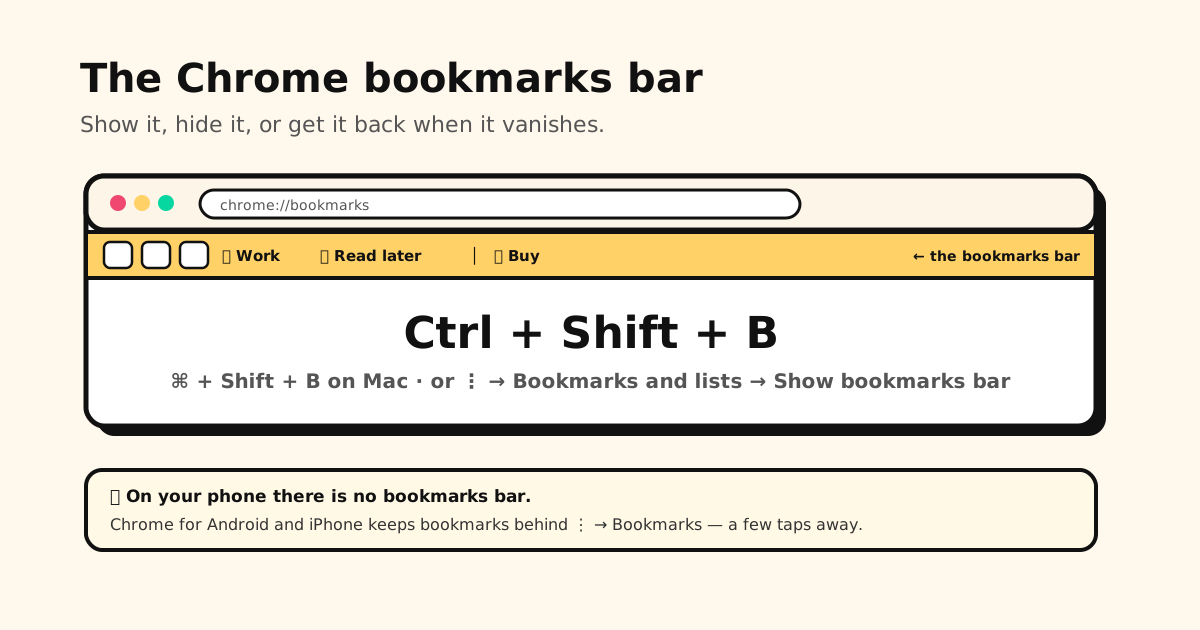
Quick answer: press Ctrl+Shift+B (Cmd+Shift+B on Mac) to show or hide the Chrome bookmarks bar. Prefer menus? Click More ⋮ → Bookmarks and lists → Show bookmarks bar. If the bar keeps appearing on the New Tab page even after you hide it, that’s recent Chrome behavior, not your settings — details and workarounds below.
How to show the bookmarks bar in Chrome
Pick whichever is fastest for you:
- Shortcut: Ctrl+Shift+B on Windows, Linux and ChromeOS; Cmd+Shift+B on Mac.
- Menu: More ⋮ (top right) → Bookmarks and lists → Show bookmarks bar.
- Settings: Settings → Appearance has a bookmarks bar option too.
The bar appears just under the address bar, on every page.
How to hide the bookmarks bar
The same three routes switch it off: press Ctrl+Shift+B / Cmd+Shift+B again, untick Show bookmarks bar in the Bookmarks and lists menu, or right-click the bar and untick Show bookmarks bar.
Why it still shows on the New Tab page
In recent versions, Chrome keeps the bookmarks bar visible on the New Tab page even when you’ve hidden it everywhere else — Google treats the New Tab page as a launchpad. The shortcut hides it again as soon as you open a website.
Google has been testing a replacement for the simple on/off switch: a choice under Settings → Appearance to show the bar everywhere, only on the New Tab page, or never. If your Chrome has that option, choose to always hide it. If not, using a different New Tab page (for example one set by an extension) is the practical workaround.
Bookmarks bar not showing in Chrome? Check these
- It’s switched off. Press Ctrl+Shift+B / Cmd+Shift+B — this fixes most cases.
- Full-screen mode. Full screen hides all toolbars. Press F11 on Windows, or Ctrl+Cmd+F on Mac, to leave it.
- Wrong profile. Each Chrome profile has its own bar and bookmarks. Check the profile icon at the top right.
- Your organization controls it. On a work or school computer, an admin policy can turn the bar
off. If
chrome://managementsays your browser is managed, ask your IT team. - The bar is on, but empty or missing items. Open the Bookmark Manager (Ctrl+Shift+O) and look inside the Bookmarks bar folder. If bookmarks are missing on one device but not another, it’s usually a sync problem.
Bookmark icons missing on the bar
When favicons turn into blank globes — often after a sync or an import — opening the site once usually brings its icon back. Chrome doesn’t let you choose a custom icon for a bookmark.
How to clear the bookmarks bar
“Delete the bookmarks bar” can mean two things:
- Get rid of the bar itself: you can’t delete it — just hide it (above).
- Delete what’s on it: open the Bookmark Manager (Ctrl+Shift+O, or Cmd+Option+B on Mac), click the Bookmarks bar folder, press Ctrl+A (Cmd+A) to select everything, then Delete. The folder stays; it’s just empty.
Want to keep those links? Drag them into another folder first, or export a backup copy. Deleted too much? Here’s how to recover deleted bookmarks.
Make the bar worth showing
A cluttered bar is the main reason people hide it. A few habits keep it useful:
- Daily sites only — five or six. Everything else goes into folders.
- Icon-only bookmarks: edit a bookmark and clear its name so only the icon shows.
- Folders on the bar open as drop-downs — one Work folder beats ten buttons.
- Fake separators: Chrome has none, but a bookmark named | pointing at
about:blankdoes the job.
The full system is in how to organize Chrome bookmarks.
Edge and Brave
Both are built on the same engine as Chrome, and Ctrl+Shift+B (Cmd+Shift+B on Mac) toggles the bar in both. Their settings also let you pick when it shows:
- Microsoft Edge calls it the favorites bar. In Settings → Appearance, set Show favorites bar to Always, Never or Only on new tabs.
- Brave: in Settings → Appearance, set Show bookmarks to always, never, or only on the new tab page.
On your phone, there’s no bookmarks bar
Chrome on Android phones and iPhone has no bookmarks bar. Your bookmarks sit behind More ⋮ → Bookmarks — a few taps every time. (Android tablets and foldables are the exception: since Chrome 146 you can switch the bar on under Settings → Appearance → Show bookmarks bar. It stays hidden on narrow phone screens.) For one-tap access to a site you open daily, use the shortcut tiles on Chrome’s New Tab page, or add the site to your home screen (⋮ → Add to Home screen on Android, Share → Add to Home Screen on iPhone).
And for the links you save on your phone from apps — TikTok, Instagram, Reddit, YouTube, group chats — Chrome bookmarks never see them in the first place. Tuckii is an iPhone and Android app built for those: share a link from any app, sort it into a collection, and find it again with search. No account, and your links stay on your device.
The bookmarks bar your phone never had
Save links from any app into Tuckii and keep them one search away — sorted into collections, stored on your device, no account needed.
Download Tuckii free →Still hunting for where your phone keeps bookmarks? Here’s where to find bookmarks on any phone.